#include <qdbttabcell.h>
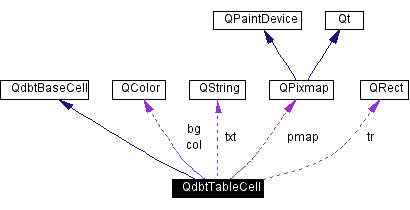
Inheritance diagram for QdbtTableCell:
Public Types | |
| enum | BorderType { LeftBorder = 0x0001, RightBorder = 0x0002, TopBorder = 0x0004, BottomBorder = 0x0008 } |
Public Methods | |
| QdbtTableCell () | |
| QdbtTableCell (const QdbtTableCell &) | |
| QdbtTableCell (QString text, const QPixmap *pixmap, const QColor &color=QColor(), int align=Qt::AlignLeft, bool edit=FALSE) | |
| virtual | ~QdbtTableCell () |
| virtual void | setText (QString text) |
| virtual QString | text () const |
| void | setPixmap (const QPixmap *pixmap) |
| const QPixmap & | pixmap () const |
| virtual void | setColor (const QColor &color) |
| virtual const QColor & | color (QdbtBaseTabular *) const |
| virtual void | setBackground (const QColor &color) |
| virtual const QColor & | background (QdbtBaseTabular *) const |
| void | setAlignment (int alignment) |
| int | alignment () const |
| void | setPixmapAlignment (int alignment) |
| int | pixmapAlignment () const |
| virtual int | widthHint (const QFontMetrics &fm) const |
| virtual int | heightHint (const QFontMetrics &fm) const |
| int | borderMode () |
| void | setBorderMode (int borderStyle) |
| virtual void | setEditable (bool state) |
| bool | isEditable () const |
| virtual void | paintFocus (QPainter *p, QdbtBaseTabular *t, const QRect &r, bool selected, bool editing=FALSE) |
| void | rightButtonClicked (QdbtBaseTabular *tab, int row, int col) const |
Protected Methods | |
| virtual QWidget * | editor (QdbtBaseTabular *) const |
| virtual void | paint (QPainter *p, QdbtBaseTabular *t, const QRect &r, bool selected, bool editing=FALSE) |
| virtual QRect | getTextArea () const |
| virtual QRect | getEditArea (int width) const |
| virtual QdbtBaseCell * | clone (QdbtBaseTabular *) const |
| virtual bool | beginEdit (QdbtBaseTabular *, int row, int col, const QRect cellGeometry) const |
| virtual bool | acceptEdit (QdbtBaseTabular *, int row, int col) |
| virtual bool | cancelEdit (QdbtBaseTabular *, int row, int col) |
| virtual bool | mouseEvent (QdbtBaseTabular *, int row, int col, QMouseEvent *e, const QRect cellGeometry) |
| virtual bool | keyEvent (QdbtBaseTabular *, int row, int col, QKeyEvent *e, const QRect cellGeometry) |
| virtual void | setEditorEnabled (QdbtBaseTabular *, bool) const |
| virtual void | moveEditor (QdbtBaseTabular *, const QRect cellGeometry) const |
| bool | aboutToBeEdited (QdbtBaseTabular *) const |
| void | notifyOnEditResult (QdbtBaseTabular *tab, int row, int col, int result, QString oldText) |
| QFont | font (QdbtBaseTabular *) const |
| bool | prepareEditor (QdbtBaseTabular *tab, const QRect &geom) const |
| bool | cleanupEditor (QdbtBaseTabular *tab) const |
Static Protected Attributes | |
| int | MASK_EDITABLE = 0x0001 |
| int | MASK_SELECTABLE = 0x0002 |
| int | MASK_SELECTED = 0x0004 |
| int | bw = 4 |
This class represents a cell of a QdbtTabular. A cell consists of a text (default the empty string) and a pixmap (default the null Pixmap).
The cell itself is not aware of its width and height, but can compute its preferred size given the font metrics that are used for the text.
The alignment of the pixmap with respect to the text can be controlled using setPixmapAlignment(). The alignment of the cell as a whole can be controlled using setAlignment().
Suppose you have QdbtTabular table widget called tabular. To change some properties of the cell at location (row,\e col) in this table use the following code:
  // create a local copy of the cell
  QdbtTableCell cell(*tabular->cell(row,col));

  // change some properties of the cell

  .
  .
  .

  // update the cell at (row,col) in the table
  tabular->changeCell(&cell,row,col);
example1.cpp, example2.cpp, example3.cpp, example4.cpp, and example5.cpp.
|
|
Enum type for the possible border lines to be drawn |
|
|
Constructs a cell with the following properties:
|
|
|
This constructor copy the supplied cell |
|
||||||||||||||||||||||||
|
Constructs a cell with the following properties:
|
|
|
Destroys the cell |
|
|
This function interacts with the table and clarifies, if a new editing session may be started. If this function returns
|
|
||||||||||||||||
|
After editing has been done (and e.g. Return/Enter has been pressed), this function evaluates if the modified cell content is acceptable (when a pattern for the cell's column has been set, this pattern is being matched) and notifies the user on the edit's outcome. This function retreives the current value from the editor and stores it within the table's cell (if accepted) Reimplemented from QdbtBaseCell. |
|
|
Returns the alignment of the text-pixmap pair.
|
|
|
Returns the background color of the cell.
Reimplemented from QdbtBaseCell. |
|
||||||||||||||||||||
|
Begin a new edit session. For this purpose a line editor is being initialized and show at the place, that is being occupied by the table's cells at row, col with the geometry cellGeometry Reimplemented from QdbtBaseCell. |
|
|
Function orthogonal to setBorderMode(). The mode of the cureent cell's border is or'ed together from the base border modes. |
|
||||||||||||||||
|
If an edit-session has to be canceled for any reason, the table will use this function to ask for cancellation of an edit-session. The edit-session should then be canceled if possible.
When cancelEdit() returns
Reimplemented from QdbtBaseCell. |
|
|
This member cleans up a cell's editor and ensures that the editor is not visible any longer.
|
|
|
This abstract method is being used to produce a new instance with exactly the same internal state as the original object was. If is being used whenever a copy of a cell has to be produced, e.g. when changing cells within the tabular widget's table matrix. For initializing the new cell properly, the context of the cell (the tabular widget, that it is located in) is being transfered to the clone() function.
Implements QdbtBaseCell. |
|
|
Returns the color of the cell's text.
Reimplemented from QdbtBaseCell. |
|
|
This functions serves to determine the editor widget associated to a table cell. This function should be provided within a derived class, since the function determining if a tabular contains the keyboard focus relies on it. However it is safe to return 0, if no editor may be returned or even is only produced on demand. Reimplemented from QdbtBaseCell. |
|
|
Read the font, that has been set for the QdbtTabular Widget. This font should be used for all text-editor facilities.
|
|
|
Reimplemented for internal reasons; the API is not affected. Reimplemented from QdbtBaseCell. |
|
|
Reimplemented for internal reasons; the API is not affected. Reimplemented from QdbtBaseCell. |
|
|
Returns the preferred height of the cell. This is not the actual cell height, but the height that is required to fit both text and pixmap in the cell.
Reimplemented from QdbtBaseCell. |
|
|
Returns
|
|
||||||||||||||||||||||||
|
This method is used to inform a table cell about a key press event. The cell receives its coordinates with the table's matrix as row, col, all information on the key pressed e as well as its current geometry cellGeometry in the coordinate system of the table's cell matrix.
If this method returns Reimplemented in QdbtComboCell. |
|
||||||||||||||||||||||||
|
This method is used to inform a table cell about a mouse press event. The cell receives its coordinates with the table's matrix as row, col, the coordinates of the mouse click relative to the table's cell matrix as e as well as its current geometry cellGeometry in the coordinate system of the table's cell matrix.
If this method returns Reimplemented in QdbtComboCell. |
|
||||||||||||
|
This method is called whenever a table cell is being edited and the table is repainted. The method should check if the geometry of handed over is the same as the geometry applied to the editor widget and - if not - should resize or move the editor widget to the correct position. The default implementation determines the editor widget by calling editor() and moves it to the correct location. |
|
||||||||||||||||||||||||
|
This function interacts with the tabular components and may be used to communicate the result of an edit session to the remaining programm parts. |
|
||||||||||||||||||||||||
|
Reimplemented for internal reasons; the API is not affected. Reimplemented from QdbtBaseCell. |
|
||||||||||||||||||||||||
|
This function is called whenever the cell's focus needs to be repainted. The width of the cell is w and the height is h is passed. To be able to interact with the tabular widget (e.g. for style support) that paints this cell, a pointer to it is passed to this function. The painter p automatically clips against the area of the cell. Reimplemented in QdbtComboCell, and QdbtBorderlessComboCell. |
|
|
Returns the pixmap of the cell.
|
|
|
Returns the align of the pixmap with respect to the text. Possible values are:
|
|
||||||||||||
|
Prepare the cell's editor for the about-to-be-started edit session.
|
|
||||||||||||||||
|
This functions informs the user, that the right mouse buttons has been pressed on top of the cell in row row and col col. This method should be used within each of the editor widgets mapped on top of the table components, for the 'normal' cells this signal is begin generated automatically. |
|
|
Set the alignment of the text-pixmap pair. Possible values are:
|
|
|
Sets the color of the background of the cell. If an invalid color is supplied (the default), then the background color of the table will be used.
|
|
|
Sets the mode, in which cell borders are drawn. They may be composed (or'ed) out of the following components:
|
|
|
Sets the color of the text to color.
|
|
|
Sets whether or not the cell may be edited by the application user.
If state is
If state is
|
|
||||||||||||
|
This function serves to temporaryly disable/enable the editor widget, if there is any. The default implementation determines the editor widget by calling editor() and disables or enables it according to enable. |
|
|
Set the pixmap of the cell to pixmap.
|
|
|
Sets the alignment of the pixmap with respect to the text. Possible values are:
|
|
|
Set the text of the cell to text.
|
|
|
Returns the text string of the cell.
Reimplemented from QdbtBaseCell. |
|
|
Returns the preferred width of the cell. This is not the actual cell width, but the width that is required to fit both text and pixmap in the cell.
Reimplemented from QdbtBaseCell. |
|
|
Default spacing value for tabular cells. |
 1.2.15-20020421